


Image to Video: Turn a Single Product Photo into High-Converting Demo Clips
Learn how to convert one product photo or brief into short-form demo clips and landing-page loops using GoCrazyAI AI Video Generator. Step-by-step workflows included.
<!-- KEYTAKEAWAYS -->- Adding short explainer or demo video to product pages frequently raises conversions by 34%–86% depending on format and test conditions.- Image-to-video tools let you produce multiple aspect ratios and localized variants from one photo, drastically cutting time and cost versus staged shoots.- GoCrazyAI AI Video Generator animates stills and accepts text prompts, routing to Kling, Veo, or Sora models and exporting 9:16, 1:1, and 16:9 outputs.- Use AI-generated 10–30s clips for social hooks and landing-page loops; reserve filmed video for complex interactions or influencer-driven storytelling.- Measure success with view-through, CTR, time-on-page, and conversion lift—A/B test video vs. photo and a fast-loading video vs. slower large-file variant.<!-- /KEYTAKEAWAYS --> Picture a single product photo—clean studio shot, white background—converted in minutes into a 20-second TikTok hook that explains, demonstrates, and converts. That’s not a stretch anymore: image to video workflows let e-commerce teams replace slow shoots with fast, testable clips. In this guide I’ll show repeatable, conversion-focused ways to turn one still image or a short brief into high-performing short-form product videos using the AI video generator.
The GoCrazyAI AI Video Generator can animate a still, accept a text brief, and output 9:16, 1:1, and 16:9 deliverables for TikTok, Reels, and landing pages—so you can iterate ideas quickly without a production team. Read on for the data that proves video moves the needle, when to choose AI-generated demos, how image-to-video models work today, two complete workflows you can ship this afternoon, creative prompts that convert, a legal and quality checklist, and the exact metrics to use when measuring ROI.
Why short-form product videos outperform static photos: data marketers can’t ignore
Short-form product video is no longer an optional asset for e-commerce — it's a conversion lever. Multiple industry roundups and A/B tests show adding explainer or demo video content to product pages can lift conversions substantially: reported uplifts range from roughly 34% to as high as 86% depending on creative format, placement, and traffic source[[1]](#source-1). Marketers who run sequential tests also find that short, focused demo clips (10–30 seconds) usually outperform long tutorial formats for first-touch traffic because they answer the single question a visitor has: "What does this product do for me?".
Beyond conversion percentages, brand teams report two practical advantages: rapid hypothesis testing and ad creative diversity. According to an industry survey, 41% of brands are now using AI for video (up from 18% the prior year), with short-form formats and how-to clips among the top use cases[[2]](#source-2). That rapid adoption matters because it changes the production calculus — you can now spin multiple hooks, test thumbnails, and localize variations in hours instead of days or weeks.
But there are caveats. High-performing video must match user intent and not hurt page load speed; some analyses show neutral or negative effects when video is irrelevant or heavy on file size[[3]](#source-3). This is why modern image-to-video workflows focus on short, optimized loops and multiple aspect ratios that match the user's platform and intent.
When to use an AI-generated product demo clip vs. a filmed video
AI-generated demos are the fastest route to a working asset when your goal is scale, speed, or iteration. Use AI-generated product demo clips when:
- You have a single product photo and need many aspect ratios (9:16 for socials, 1:1 for feeds, 16:9 for YouTube) quickly.
- You want to test multiple hooks or messaging variants before committing to a filmed production.
- Localization or rapid A/B testing is required — AI makes creating multi-language and multi-CTA variants quick and affordable.
Filmed video still wins when physical interaction, tactile detail, or human authenticity is central to conversion. Examples: complex assembly choreography, influencer endorsement, or scenes that demand specific lighting and actor timing. Live shoots also produce higher-fidelity sound and uncontrolled environmental nuances that can drive trust.
A practical rule: if the demo is product-focused, short, and benefits from stylized motion (spins, 3D parallax, animated overlays), choose AI-generated clips. If you need close-up tactile proof or a personality-driven endorsement, plan a filmed shoot. In both cases you can combine assets: use an AI-generated hook to warm the audience and a filmed demo for depth.
How image-to-video technology works today (models, limitations, and what to expect)
Image-to-video and text-to-video are now mainstream capabilities across major model families. Companies like OpenAI (Sora), Google (Veo), and Runway offer short-clip generation and image-to-video preview features that specifically target 5–30 second clips suitable for social and landing-page use[[4]](#source-4). These models work by extending image generation pipelines with temporal coherence components so the subject maintains identity while motion is introduced.
What to expect from modern image-to-video:
- Best use case: stylized motion, product rotations, parallax, animated labels, and short demo actions (pouring, pressing, toggling). These are where current models excel.
- Typical length: single-digit to low-double-digit seconds; many tools optimize for 5–30 second outputs.
- Output variability: models produce plausible motion but can struggle with precise physical interactions or long continuous scenes; iterate prompts and seed values for consistency.
Performance improvements (fast modes and previews) are a focus — Google’s Veo 3 emphasized faster generation and public preview for short clips to speed ad workflows[[5]](#source-5). But there are technical limitations: heavy scene complexity, long-form narratives, and tiny text on packaging can be unreliable. That’s why GoCrazyAI routes jobs to multiple models (Kling 2.5 Turbo Pro, Veo 3.1, and Sora 2) so you can pick a model that matches your fidelity and speed needs from a single credit pool. This model routing is powerful for creators who need both speed and quality without juggling subscriptions.
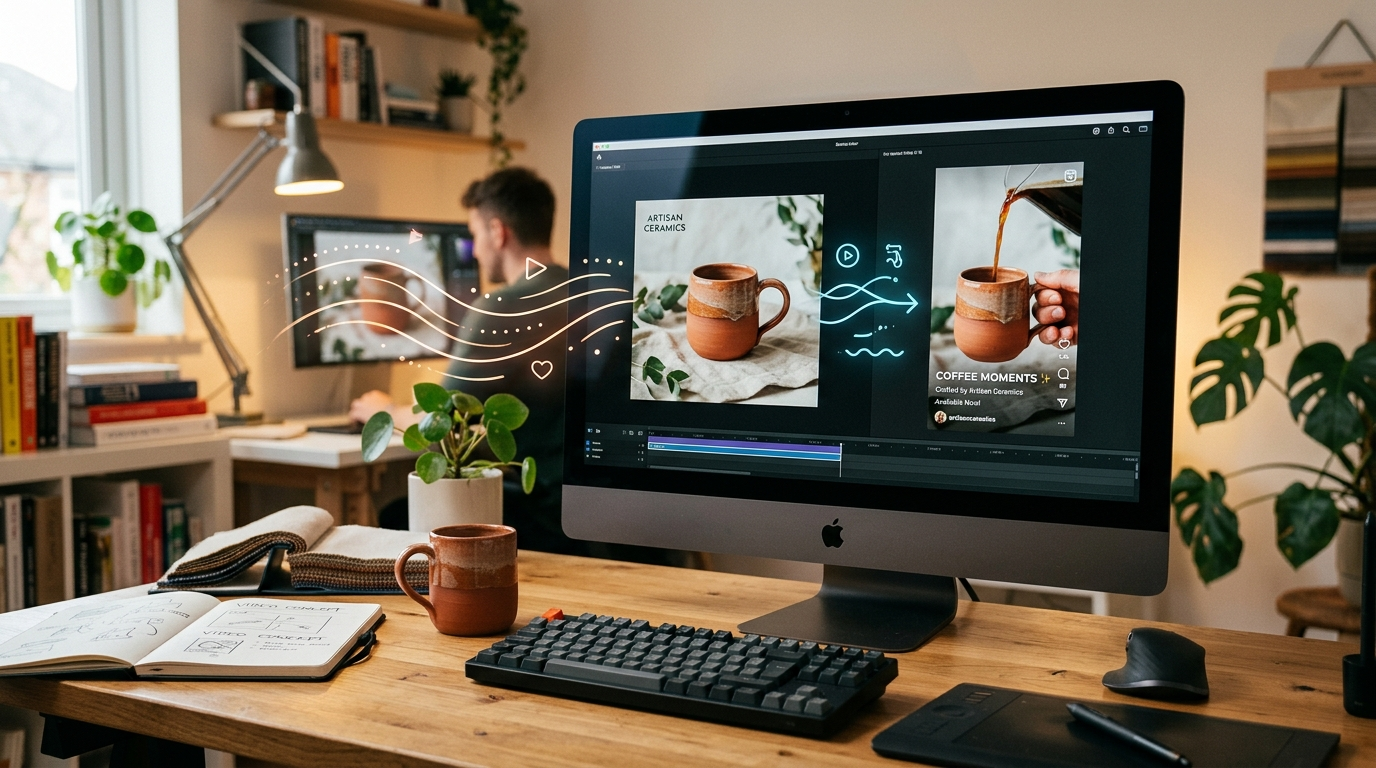
Workflow A — Turn one product photo into a 15–30s TikTok/Reels hook (step-by-step using GoCrazyAI AI Video Generator)
This workflow shows how to convert a single still into a short-form social hook in under 20 minutes. It uses the GoCrazyAI AI Video Generator to animate the product photo, add motion and on-screen text, and export 9:16 for TikTok or Reels.
Step-by-step (quick):
1) Prepare your assets: a high-res product photo (white or lifestyle), 1–2 short benefit bullet points, and a short CTA line (e.g., "Try it risk-free"). 2) Open the GoCrazyAI AI Video Generator and choose 'Animate still image' or paste a 1–2 sentence text brief describing the action (e.g., "Rotate product 270°, reveal close-up of button, add soft shadow, upbeat tempo"). 3) Select a model: pick Kling 2.5 Turbo Pro for cinematic motion or Veo 3.1 for faster iteration. Choose 9:16 output. 4) Add motion parameters: specify duration (15–20s), intro zoom (0–2s), main reveal (6–12s), and CTA card (last 3s). Use the built-in subtitle overlay for captions. 5) Preview and iterate: tweak seed, pacing, or motion cues until the product remains on-model. 6) Export final clip and generate 1:1 and 16:9 variants from the same prompt.
Why this works: short hooks must communicate benefit within the first 3 seconds and show the product in use or motion. The GoCrazyAI AI Video Generator automates the heavy lifting: it animates the still, lets you pick the best model for speed or quality, and exports platform-ready aspect ratios. If you need a custom background or relighting before animation, run the image through the GoCrazyAI AI Image Generator or AI Image Relighter first to match your brand tone (see /ai-image-generator).
Workflow B — Create a 10–20s looping product demo for landing pages and hero sections (optimize for load speed and conversions)
Landing-page loops are a focused use case: short, silent, and attention-grabbing clips that communicate a product's core utility without extending page load. The goal is a 10–20 second loop that starts and ends in visually compatible frames so playback looks seamless.
How to build it:
- Keep it short and silent. Use brief motion (360° spin, button press, or liquid pour) with a subtle loop point at second 10–12.
- Prioritize compression-friendly formats: export H.264 or small WebM variants and provide a low-bandwidth fallback GIF or poster image for poor connections.
- Test load time: use a performance budget (e.g., 200–400 KB for the loop) and serve a single looping file that auto-plays muted.
Step-by-step in GoCrazyAI:
1) Start with your reference photo. In the AI Video Generator, choose 'Image-to-video loop' and set duration to 10–12s. 2) Pick a model optimized for crisp motion; choose Veo 3.1 Fast for quick tests or Kling for higher visual fidelity. 3) Set the final frame to match the first frame (small reverse pan or stabilized rotation) so the playhead loops cleanly. 4) Export a low-bandwidth WebM and a 720p MP4; compress the WebM with a 200–400 kbps target for hero sections. 5) Implement lazy-loading and poster fallback on the page; A/B test photo vs. loop to measure conversion lift.
Why compression matters: some studies show video can hurt conversions when it slows load time or mismatches intent[[3]](#source-3). A well-optimized loop keeps the SEO and UX intact while giving users the explanatory motion they need. Use GoCrazyAI's multi-aspect exports to prepare both hero and mobile hero variants in one job.
Creative prompts and templates that consistently convert (voice, motion, framing, calls-to-action)
High-converting short-form product clips follow repeatable creative patterns. Use these templates as starting points, then iterate:
1) The One-Benefit Reveal (0–15s): 0–3s — hook visual (rotate or close-up), 3–10s — show primary benefit in use, 10–15s — CTA card. Prompt example: "Start with a 2s close-up, pull back to show product in-hand, overlay text 'Lasts 48 hours', end on CTA 'Shop now'."
2) The Problem-Solution Cut (0–20s): 0–4s — show problem copy/visual, 4–14s — product in motion solving it, 14–20s — social proof or CTA. Prompt example: "Show spilled coffee, then quick product application that repels spill, soft parallax, 'Stay clean' CTA."
3) The Loopable Detail (10–12s): a tight 360° spin or button press designed to loop smoothly. Prompt: "360° slow spin, soft shadow, end frame matches start, subtle camera drift for natural loop."
Voice and music: Short clips usually perform best muted on social, so rely on subtitles and bold on-screen text. For landing pages, add a subtle ambient bed or a short instrumental loop. GoCrazyAI AI Music Generator can produce a custom 8–12s motif to match brand tone—export it and add it in the Media Mixer (/ai-music and /ai-video-edit).
Framing tips: Center the product for thumbnails; reserve dynamic off-center framing for narrative pieces. Use 9:16 for feeds, 1:1 for paid social square crops, and 16:9 for long-form or YouTube shorts repurposing. Keep any on-screen text readable at mobile widths: 28–36px minimum.
Quality, legal, and brand-safety checklist for AI-generated product videos
Before you publish, run this checklist:
- Quality checks: confirm product fidelity (no visual artifacts on logos or text), verify color accuracy against brand swatches, and test loop smoothness across devices.
- Technical checks: export the correct aspect ratios, validate file sizes (aim for small WebM for hero loops), and include a poster image fallback.
- Legal checks: use original product photography or ensure you have rights to the reference image; do not feed private customer images without consent.
- Claims and compliance: any performance claims must match product testing and labeling requirements; avoid unverifiable statements in overlays.
- Brand-safety: audit generated backgrounds, human faces, and language for unintended biases or content that conflicts with brand guidelines.
Why licensing matters: AI models can sometimes blend features from training data; ensure your reference assets and final clip meet your IP standards. If you need to refine a photo first, use the GoCrazyAI AI Image Generator for controlled edits or the Image Upscaler to get crisper base images before animation (/ai-image-generator). For narration or bespoke voiceovers, use GoCrazyAI AI Voices to produce compliant, on-brand voice tracks.
Measuring performance: the metrics and A/B tests that prove ROI for short-form product clips
If the goal is conversion lift, set up a measurement plan before you publish. The central metrics to track:
1) View-through rate (VTR) on social — tells you whether the hook retains attention. 2) Click-through rate (CTR) from social to landing page — measures creative-to-landing relevance. 3) Time-on-page and scroll depth once on the product page — video should increase time and engagement. 4) Conversion rate lift — run a proper A/B test: photo vs. AI-generated loop or video and measure conversion delta with statistical significance.
A/B testing tips:
- Randomize by user session and run long enough to reach significance. Compare the photo baseline to the AI-generated clip and a hybrid variant (clip + testimonial).
- Segment by traffic source: organic social, paid social, search, and email can respond differently to video.
- Measure trade-offs: monitor load time and bounce rate alongside conversion; a heavy file that increases conversions but reduces organic ranking can be a net loss.
Real-world proof: adding an explainer video can boost landing page conversions by up to 80% in some tests; however, the impact varies by execution and traffic source[[1]](#source-1). The fastest wins come from rapid iteration: generate 5–10 variants with slightly different hooks using the GoCrazyAI AI Video Generator, test them in ad creative sets, and scale the winner. The platform’s multi-model routing and multi-aspect exports let you iterate creative hypotheses quickly without incurring multiple tool subscriptions.
Frequently Asked Questions
How long should an image-to-video clip be for social ads?
Aim for 15–20 seconds for hooks (TikTok/Reels) and 6–12 seconds for looping hero clips on landing pages. Shorter clips perform better for first-touch awareness.
Can AI-generated clips match my brand colors and fonts?
Yes—start with a brand-guided reference image and provide exact color hex codes and font instructions in the prompt. For tighter control, edit the image in GoCrazyAI’s image tools before animating (/ai-image-generator).
Are AI-generated videos safe to use for paid ads?
Yes if you follow the quality and legal checklist: use owned reference images, avoid unverified claims, and inspect outputs for artifacts. For narration, use GoCrazyAI AI Voices to keep messaging on-brand.
Conclusion
AI image-to-video workflows have moved from novelty to a practical production tool for anyone who needs fast, testable product clips. Use GoCrazyAI AI Video Generator to animate a still or run a text brief, export all platform aspect ratios, and route jobs to Kling, Veo, or Sora without juggling multiple subscriptions. Start by shipping a 15–20s social hook or a 10–12s landing-page loop, measure view-through and conversion lift, then scale winning variants. Open the AI Video Generator, drop in your product photo or prompt, and ship a conversion-ready clip in your next break.
Sources
- OpenAI, Google and Runway race to generate AI video — Axiosaxios.com ↗
- Google's Veo 3 update could let users generate videos faster — TechRadartechradar.com ↗
- 41% of brands using AI for video, up from 18% last year — MarTechmartech.org ↗
- Video on Landing Page Impact: Key Marketing Statistics (2026 roundup)contentmation.com ↗
- Video Landing Pages: 8 Examples & Best Practices — Apexureapexure.com ↗
- Image to Video AI: 10 Best Tools (2026 guide) — FlowShortsflowshorts.app ↗
- Video on Landing Pages: When It Helps vs Hurts Conversions — Unbounceunbounce.com ↗
- Video Marketing Statistics 2026: ROI, Short-Form, AI & Conversion Data — Loopex Digital (industry stats roundup)loopexdigital.com ↗